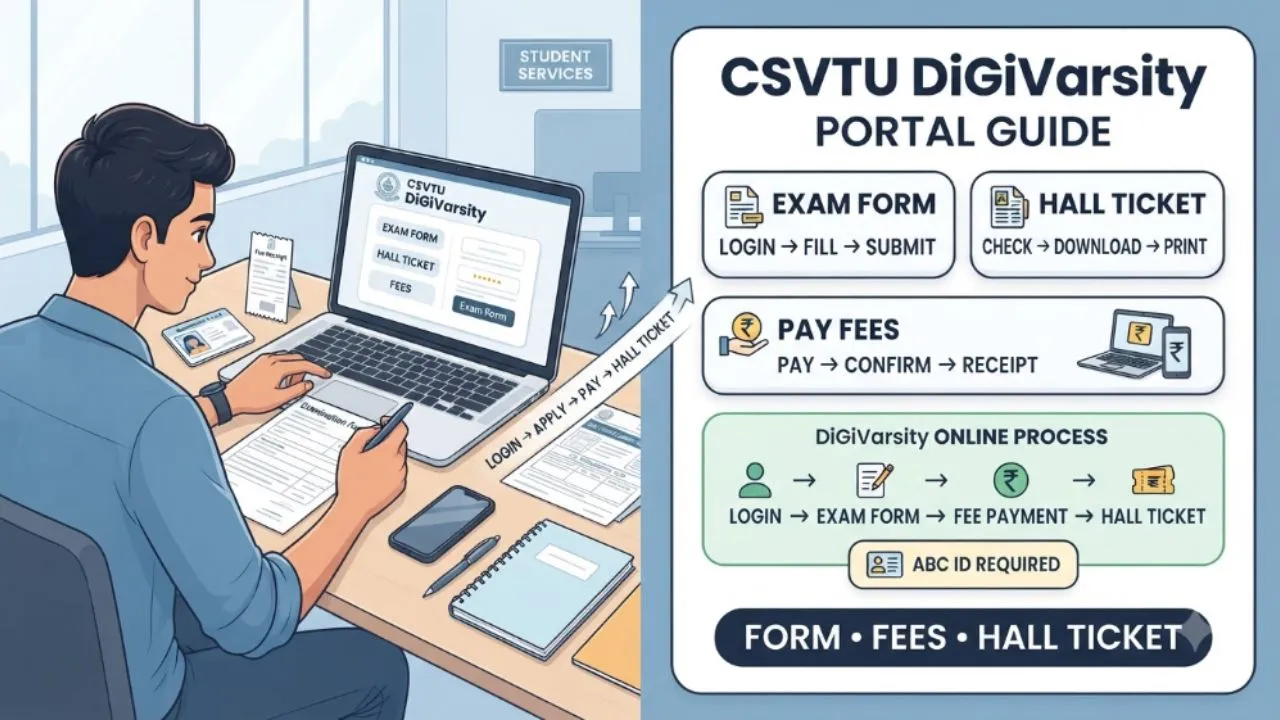
For students studying under Chhattisgarh Swami Vivekanand Technical University, the DiGiVarsity portal has become an important part of the examination process. Exam forms, fee payments and examination-related updates are handled through online systems. The process can feel confusing when a student is using the portal for the first time. A small mistake in the exam form, missed deadline or incomplete payment can create problems later.
CSVTU has also used DiGiVarsity for different examination sessions and courses. Recent university notifications confirm that examination forms are submitted online through the portal, while institutions are responsible for checking and approving student forms. This guide explains how CSVTU students can approach the DiGiVarsity process, what to check before submitting an exam form, how hall tickets are connected with the process and what to do when an online issue occurs.
Table of Contents
What Is the CSVTU DiGiVarsity Portal?
DiGiVarsity is an online platform used by CSVTU for several examination-related activities. Students can use the system for examination form submission and related processes when the university opens the portal for a particular examination session.
The portal is not necessarily open throughout the year for every service. CSVTU activates examination-related facilities according to the schedule announced for a particular semester and examination session. For example, the university issued notifications for the April-May 2026 examinations and opened the DiGiVarsity process for eligible students.
This means students should not rely on an old exam-form schedule. The dates applicable to one examination session may not remain the same for another.
When Does DiGiVarsity Open for Exam Forms?
CSVTU generally announces the opening and closing dates through official examination notifications. The notification specifies the courses, semesters, examination scheme and whether regular or backlog candidates are included.
Students should check the university notice before starting the application. Do not wait until the final day to submit the form. CSVTU has specifically advised students in its examination notifications to start filling forms as soon as the DiGiVarsity portal opens. Timely submission also helps avoid applicable late fees.
The college or institute may also need to approve submitted examination forms. Therefore, completing the online form is not necessarily the final step in the entire process.
Documents and Details to Keep Ready
Before opening the examination form, keep your academic and personal details available. You may need information such as your enrollment details, semester, course, subject information and other details already associated with your university record.
A photograph and signature may also be required depending on the form and portal requirements. The older CSVTU examination-form manual specifically required a scanned coloured photograph and scanned signature for the online examination process. Current requirements can differ, so students should follow the instructions displayed for their particular examination session.
Check your name, enrollment number, course, semester and examination subjects carefully before submitting. If any information shown in the portal is incorrect, contact your institute rather than entering unrelated information yourself.
How to Fill the CSVTU Exam Form Online
The exact screen layout can change as the university updates its online systems. The basic process, however, follows a straightforward sequence.
Step 1: Check the Official Examination Notification
Start by checking the latest examination notification issued by CSVTU.
Confirm that your course and semester are included.
Also check whether the notice applies to regular candidates, backlog candidates or both.
The opening date and final submission date should be noted before proceeding.
Step 2: Open the DiGiVarsity Examination Portal
Use the examination portal link provided through the university or your institute.
Avoid relying on random links shared through social media groups.
A fake or incorrect website can expose students to unnecessary security risks.
Step 3: Log In With Your Student Details
Enter the login information requested by the portal.
After logging in, verify that the displayed student information belongs to you.
Pay particular attention to your name, enrollment details, course and semester.
Step 4: Select the Examination Form
Choose the relevant examination form available for your semester.
Regular and backlog options may appear differently depending on the examination notification.
Review the subjects displayed on the screen.
If a subject that you are supposed to appear for is missing, do not submit the form immediately. Ask your institute to verify your record.
Step 5: Check Subject Details
This is one of the most important parts of the process.
Read the subject names and codes carefully.
A mistake at this stage can affect the subjects for which you are scheduled to appear.
Students should also check whether practical, theory or backlog papers are displayed correctly wherever applicable.
Step 6: Complete the Required Information
Enter or confirm any information requested by the portal.
Upload documents or photographs if the current form requires them.
Make sure uploaded files meet the size and format requirements shown on the portal.
Step 7: Pay the Examination Fee
The examination fee depends on the applicable university rules, course and examination notification.
Do not rely on an old fee amount found on another website.
Check the amount displayed in your current examination form before making payment.
After payment, save the transaction details and payment confirmation.
Step 8: Submit and Save the Form
After checking everything, submit the examination form.
Download or save the confirmation page whenever the portal provides one.
A screenshot or PDF copy can also be useful for your records.
Do not assume that the form is complete simply because the payment was successful.
Check whether the portal shows a final submission or confirmation status.
What Happens After You Submit the Exam Form?
The submitted form may need approval from the student’s institute. CSVTU examination notifications have stated that institutes are required to check the students listed in their portal and approve examination forms so that further examination processes can be completed on time.
This is why students should not ignore the college after completing their online application. If your form remains pending, contact the examination section of your institute and ask whether any action is required. A student should keep the payment receipt and form confirmation until the examination process is completely finished.
How to Track Your CSVTU Hall Ticket
The hall ticket is an important document because it contains examination-related information needed before appearing for the paper. CSVTU’s earlier examination-form manual stated that hall tickets were released before the examination and could be accessed through the examination form system using student login credentials.
The current process can change depending on the examination session. Once hall tickets are made available, students should log in and check whether their admit card has been generated.
Do not wait until the morning of the examination to look for the hall ticket.
Download it as soon as it becomes available and verify the details.
Check your name, examination centre, subjects, semester and examination dates.
If anything appears incorrect, contact your college examination section immediately.
ABC ID and Hall Ticket Generation
Students should also pay attention to the Academic Bank of Credits, or ABC ID, requirement. CSVTU has stated in its examination notifications that creation of an ABC ID is mandatory for students appearing in specified examinations.
The university has also stated that an admit card will not be generated if the required ABC ID has not been created. This makes it important to complete any university-mandated ABC ID requirement well before the examination.
Students should not leave this step until the hall ticket release date.
What If the Payment Is Deducted but the Form Is Not Updated?
Online payment problems can happen because of network interruptions, bank delays or portal issues.
Do not immediately make another payment without checking the transaction status.
First, verify whether the amount was deducted from your bank account.
Check the payment status in the portal if that option is available.
Keep the transaction reference number, date, amount and payment screenshot.
If the portal continues to show an incomplete payment, contact your institute or follow the grievance procedure specified by CSVTU.
Avoid making repeated payments unless the university or institute confirms that another transaction is required.
What If a Subject Is Missing From the Exam Form?
A missing subject should be treated seriously. Do not select an unrelated paper simply to complete the form.
CSVTU notifications have instructed institutes to verify the names and eligibility of students appearing in examinations. Issues or grievances related to the DiGiVarsity process are to be raised through the specified ticket system.
If your subject list is incorrect, inform the examination section of your college as soon as possible. Keep a screenshot of the issue if the portal allows you to capture the relevant page.
How to Handle DiGiVarsity Portal Problems
Technical problems should be reported through the official support mechanism provided for the examination process.
CSVTU notifications have specifically mentioned generating a ticket for grievances and portal-related issues.
When raising an issue, provide useful details instead of sending a vague complaint. Mention your enrollment number, course, semester, examination session and the exact problem.
Attach screenshots or payment details when relevant. This can make it easier for the concerned team to understand the issue.
Students should also inform their college examination department because some problems require institute-level verification.
Common Mistakes Students Should Avoid
The most common problems are often caused by simple mistakes.
Do not wait for the final deadline to submit the form.
Do not assume that a successful payment means the form has been submitted.
Do not ignore an incorrect subject list.
Do not enter incorrect academic information.
Do not forget to check the hall ticket after its release.
Do not delete payment receipts or examination-form confirmations.
Do not depend entirely on information shared in student WhatsApp or Telegram groups.
Most importantly, always compare information with the latest CSVTU notification.
Final Words
The CSVTU DiGiVarsity portal has made several examination processes more convenient by moving form submission and related activities online. For students, the process becomes much easier when the examination notification, form details, payment status and institute approval are checked carefully.
Start the process early, verify every detail before submission and keep copies of important receipts. Pay particular attention to requirements such as ABC ID creation when mentioned in the applicable university notification.
If a problem occurs, use the official grievance or ticket process and inform your institute’s examination section. A few minutes spent checking the form properly can prevent much bigger problems during hall-ticket generation and examination time.