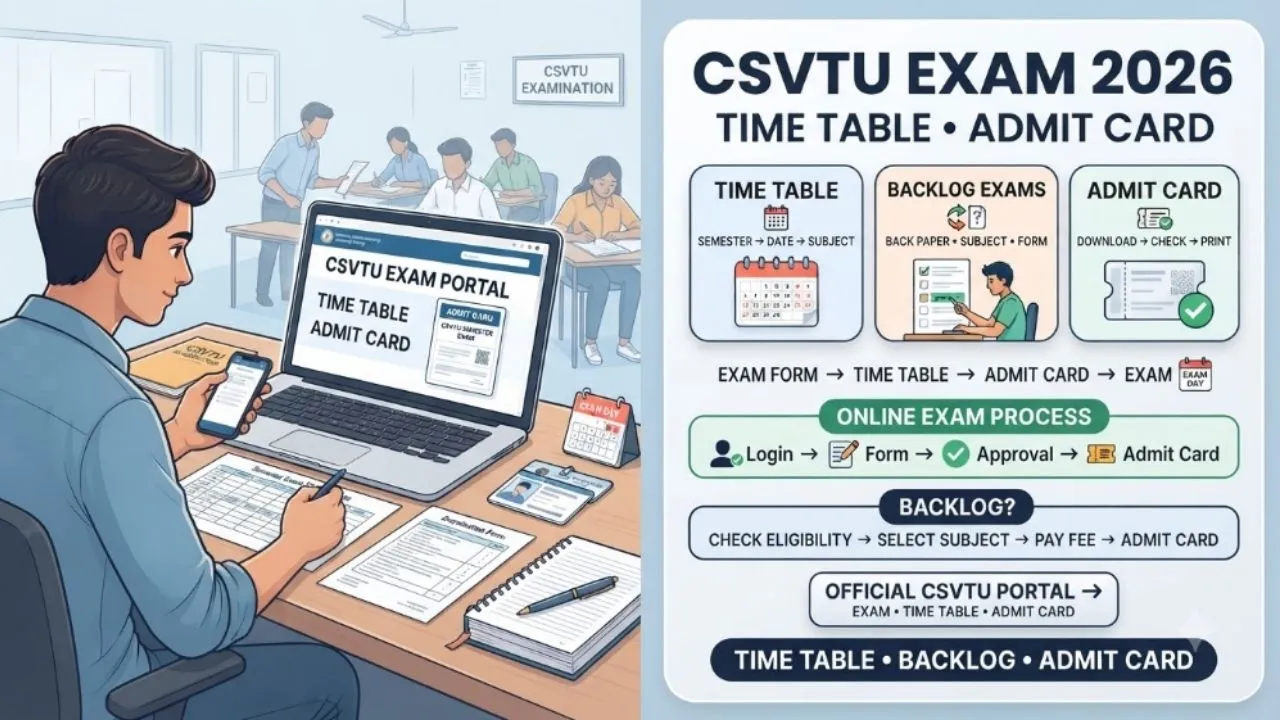
Chhattisgarh Swami Vivekanand Technical University, commonly known as CSVTU, conducts semester examinations for diploma and degree students across affiliated institutions in Chhattisgarh. For polytechnic students, the examination timetable is one of the most important documents released before the semester exams. It contains the subject-wise examination dates, paper codes, duration and reporting details.
Students with previous failed subjects also need to track backlog examination schedules separately. Missing a backlog paper or failing to submit the examination form on time can delay academic progress. This guide explains how to check the CSVTU diploma timetable, download the hall ticket, understand backlog examination rules and verify any exam postponement or revised schedule.
Table of Contents
CSVTU Diploma Timetable 2026
CSVTU publishes examination timetables through its official examination section. Diploma Engineering schedules are released separately according to semester, scheme and examination session. The university’s timetable archive includes diploma examinations under different schemes, including NITTTR, COA and NEP 2020.
For the April-May 2026 examination cycle, CSVTU listed multiple Diploma Engineering semester schedules, including first, second, third, fourth, fifth and sixth-semester examinations. Students should check the timetable corresponding to their exact semester and scheme rather than downloading a schedule meant for another group.
A revised timetable can also replace an earlier schedule. This is particularly important when a paper is rescheduled after the original timetable has already been published. The university has previously issued revised and rescheduled diploma examination timetables, so students should check for updates before each examination.
How to Check the CSVTU Diploma Exam Time Table
The process is straightforward, but students should carefully verify the semester and scheme before downloading the PDF.
Visit the official CSVTU website and open the Examination Time Table section.
Look for the Diploma in Engineering or Polytechnic examination category.
Select the relevant examination session and semester.
Open the timetable PDF for your scheme.
Check the subject code, subject name, examination date and examination timing.
Download the PDF and keep a copy on your phone or computer.
It is also useful to print the timetable because students often need to refer to it while preparing their examination schedule.
What Information Is Mentioned in the Timetable?
A CSVTU examination timetable normally provides several details that should be checked carefully. The subject or course code identifies the particular paper. The subject name tells you which examination is scheduled. The branch column indicates the diploma branch for which the paper applies.
The date and day show when the examination will take place. The duration indicates how long the paper will continue. The examination timing specifies when the paper begins and ends.
Some practical or special papers can have different durations from standard theory examinations. For this reason, students should not assume that every paper will follow the same three-hour schedule.
CSVTU Semester Exam Schedule
CSVTU diploma examinations can cover regular students as well as candidates appearing for previously failed subjects. The university has published separate schedules for different semesters and schemes.
For example, previous CSVTU diploma timetables have included papers for Civil Engineering, Computer Science, Electrical Engineering, Electronics, Mechanical Engineering, Mining and other branches.
The timetable can also contain papers applicable to more than one branch. Students should therefore match their course code with the timetable rather than relying only on the subject name.
This becomes especially useful for students studying under older schemes where course structures may differ from the current curriculum.
CSVTU Hall Ticket Download
The examination hall ticket or admit card is another important document required before appearing for the semester examination. Students should obtain the admit card through the examination system or their institute, depending on the procedure followed for the particular examination.
CSVTU uses digital systems for several student and examination-related services, including examination form processing. The exact hall-ticket availability and download process can vary according to the examination cycle.
Students should therefore follow the instructions issued for their specific examination. If the university or college provides a downloadable hall ticket, check all details immediately after receiving it.
The name, enrollment number, examination centre, semester, branch and subject information should be checked carefully. Any discrepancy should be reported to the college or examination authority before the examination.
How to Download the CSVTU Hall Ticket
When the hall ticket download facility is activated, students can generally follow these steps:
Open the official CSVTU examination or student portal.
Enter the required login information, such as enrollment details or credentials provided by the university.
Open the examination or admit-card section.
Select the relevant semester and examination session if required.
Download the hall ticket PDF.
Check the details printed on the document.
Save the file and take a printed copy if required by the examination centre.
Do not depend on a screenshot stored on a phone alone. A printed admit card is safer when the examination instructions require physical documentation.
What to Check on the Admit Card
Before leaving for the examination centre, carefully check the information printed on the hall ticket. The student’s name should match the university records.
The enrollment or roll number should be correct. The branch and semester should correspond with the examination being taken. The examination centre should be verified because students may have to travel to a different location.
The list of subjects should also be checked. If there is a major discrepancy, contact the college examination section immediately. Do not wait until the morning of the examination to report an incorrect detail.
CSVTU Backlog Examination Guidelines
A backlog paper refers to a subject that a student has not successfully cleared in an earlier examination. CSVTU provides opportunities for eligible students to appear for backlog or supplementary examinations according to the applicable examination rules.
Backlog students need to complete the examination-form process within the prescribed period. The university has previously opened its digital examination portal for both regular and backlog candidates.
The applicable dates can differ from one examination session to another. Students should therefore monitor the examination notifications issued for their semester.
Having a backlog does not mean that a student should ignore the regular semester schedule. Both the current semester papers and eligible backlog papers should be planned carefully.
How Backlog Can Affect Semester Progression
Backlog rules are particularly important for diploma students because the number of uncleared subjects can affect progression into higher semesters. Under the university’s diploma programme rules, there are limits on the number of backlog papers permitted for progression into certain higher semesters.
For example, the rules specify permissible backlog limits for promotion to the fifth and sixth semesters. The university’s applicable ordinance should always be checked because rules can be amended by the competent authority.
Students should not rely on information shared by classmates or coaching groups when deciding whether they are eligible for promotion. If you have multiple backlogs, contact your college examination section and verify your academic status.
Backlog Exam Form and Fee
Students appearing for backlog examinations normally need to submit the examination form and pay the applicable examination fee within the prescribed period. CSVTU has used its digital examination system for examination-form submission.
The university may provide different deadlines, including late-fee windows. Missing the final deadline can create serious problems because the student may not be included in the examination process.
The exact fee and dates should be checked in the notification issued for the relevant examination. After submitting the form, keep the payment receipt and confirmation details safely.
These documents can be useful if there is an issue with examination-form approval.
CSVTU Exam Postponed News: How to Verify Updates
Searches for “CSVTU exam postponed news” often increase when students hear about changes through social media or college groups. A timetable should not be considered postponed merely because a message is circulating on WhatsApp or another platform.
CSVTU can issue revised or rescheduled timetables when an examination date changes. The safest approach is to check the university’s official notices and examination timetable pages.
A revised timetable may carry a new notification number and date. Students should compare the revised document with the original timetable before changing their preparation plan.
If a paper is officially rescheduled, follow the new date mentioned in the university notification. Do not skip an examination based only on an unofficial claim that the paper has been postponed.
What to Do If a CSVTU Exam Is Rescheduled
When CSVTU officially changes an examination date, save the revised timetable immediately. Write down the new examination date and timing. Remove the old date from your study planner so there is no confusion.
Check whether the change affects another paper scheduled close to the revised date. Also monitor your college for instructions related to examination centres or reporting times.
A rescheduled paper can sometimes create a tighter preparation schedule, so students should reorganise their revision accordingly.
Preparation Strategy for Regular and Backlog Papers
Students with backlog subjects should avoid postponing preparation until the final days. Start with the syllabus and previous question papers. Identify chapters that appear repeatedly in earlier examinations. Prepare short revision notes for formulas, definitions, diagrams and technical concepts.
For practical subjects, revise laboratory procedures and important calculations. For theory papers, solve previous questions under timed conditions.
Students preparing for both regular and backlog papers should create separate revision slots for each subject. Giving all available time to the current semester while ignoring a backlog can create another academic problem later.
A balanced schedule is more practical.
Keep Track of Official CSVTU Updates
CSVTU regularly publishes examination-related information through its website. The official portal contains sections for examination timetables, notices, academic information and other student services.
Students should check these pages regularly during an examination season. This is particularly important when examination dates, form deadlines, practical schedules or hall-ticket instructions change.
The university also provides an examination helpline for student queries. If an issue cannot be resolved through the college, students can contact the appropriate CSVTU examination support channel.
Final Words
The CSVTU diploma timetable should be treated as the primary reference for semester examination dates. Students should verify their semester, scheme, branch and subject codes before following a timetable.
The same care is necessary when downloading the hall ticket and submitting backlog examination forms. For students searching for CSVTU diploma timetable updates, CSVTU hall ticket download information or CSVTU exam postponed news, the official university portal remains the safest place to verify the latest announcement. A backlog can be cleared through the applicable examination process, but students need to understand the rules governing examination forms and semester progression.
Keep the timetable, hall ticket, examination-form receipt and important university notifications saved in one place. That simple habit can prevent avoidable confusion during the examination period.