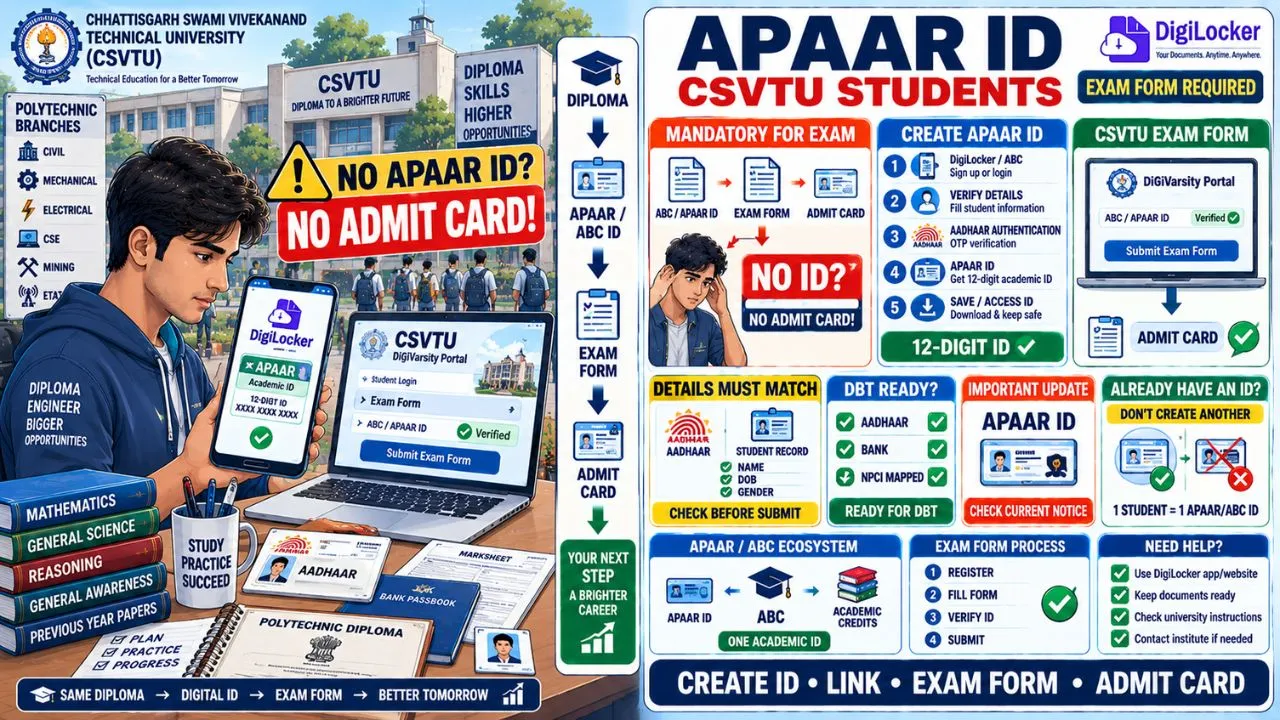
Filling the CSVTU examination form now involves more than entering semester details and paying the examination fee. Diploma students also need to pay attention to their Academic Bank of Credits and APAAR details.
For students studying in Semester 1 to Semester 6, CSVTU APAAR ID registration diploma students requirements can become important during examination form processing. CSVTU has previously instructed students appearing in examinations to create an ABC ID, warning that an admit card would not be generated if the required ID was not created.
The terminology can be confusing because students may see ABC ID, APAAR ID, DigiLocker and DigiVarsity mentioned during the same process. They are connected, but they do not mean exactly the same thing.
This guide explains how to create the ID, where to find it and what to check before submitting a CSVTU exam form.
Table of Contents
What Is APAAR ID for CSVTU Diploma Students?
APAAR stands for Automated Permanent Academic Account Registry. It provides a unique 12-digit academic identity that can remain connected with a student’s educational records.
The Academic Bank of Credits, or ABC, works with this digital academic ecosystem. It is designed to maintain academic credits received from recognised institutions.
For a diploma student, the easiest way to understand the system is this: your APAAR/ABC identity helps connect you with your digital academic records and credits.
This is why CSVTU APAAR ID registration diploma students should not be treated as an optional profile update when the university’s current examination instructions require it.
Students should also avoid creating a fresh ID every semester. An APAAR ID is intended to function as a permanent academic identity, not as a new examination number.
Why CSVTU Requires ABC/APAAR Details
Chhattisgarh Swami Vivekanand Technical University uses the DigiVarsity portal for various online academic and examination processes.
In an earlier CSVTU examination notification, the university clearly stated that ABC ID creation was compulsory for students appearing in the covered examinations. It also warned that an admit card would not be generated where the student had not created the required ABC ID.
The exact exam-form dates and portal instructions change from one examination session to another. Students should therefore follow the current CSVTU or college notice for their semester rather than relying on an old deadline.
The purpose of CSVTU APAAR ID registration diploma students is broader than one semester examination. The ID supports digital academic records, credit management and future access to academic credentials.
ABC ID and APAAR ID: Are They Different?
This is one of the most common sources of confusion.
Students who created an ABC account earlier may remember it simply as an “ABC ID.” Newer government platforms increasingly use APAAR terminology.
APAAR serves as the student’s permanent academic identity within the wider academic credit ecosystem. The official National Academic Depository guidance also explains that registering for ABC creates an APAAR ID that can be provided to an academic institution for credit-related purposes.
If you already have an APAAR/ABC ID associated with your identity, do not deliberately create another one just because the wording on a portal has changed.
Only one unique APAAR/ABC ID should be maintained by an individual. Duplicate creation can cause complications with records and access.
What You Need Before Starting Registration
Before attempting CSVTU APAAR ID registration diploma students, keep your Aadhaar details, active mobile number and correct academic information ready.
Your personal information should be consistent across academic and identity records wherever required.
Pay particular attention to:
- Full name and spelling
- Date of birth
- Gender
- Aadhaar-linked information
- Mobile number
- College or institution details
- Course information
A name mismatch is particularly troublesome. For example, if Aadhaar contains a full name while a college record uses a different spelling, verification or linking may fail.
Do not enter random details simply to complete the form quickly. Correcting a mismatch later can take considerably longer.
How to Create APAAR/ABC ID Through DigiLocker
Students can start through DigiLocker and the connected Academic Bank of Credits services.
First, open DigiLocker and sign in using your existing account. New users need to create an account and complete the required identity verification.
Once logged in, look for the academic services or search documents section. Search for Academic Bank of Credits or the available APAAR/ABC service.
Proceed with the identity and KYC verification requested by the platform.
Enter the required academic details carefully. Depending on the current interface, you may be asked for information related to your institution, admission year or course.
Diploma students should select information that matches their actual CSVTU and institute records. Do not select a similar-looking degree course when you are enrolled in a diploma programme.
Complete the consent and verification steps shown on the screen.
After successful processing, the generated APAAR/ABC identity should become available through the connected academic service or DigiLocker.
The interface can change over time, so button names may not remain identical. The important part is to use the official DigiLocker and Academic Bank of Credits workflow.
How to Find Your APAAR ID in DigiLocker
Students sometimes successfully generate the ID and then cannot locate it when filling their examination form.
Log in to the same DigiLocker account used during registration.
Check the Issued Documents section and academic documents connected with your account. A generated APAAR ID can be pushed to DigiLocker for access as a digital document.
Your APAAR ID is a 12-digit identifier.
Keep the number saved securely because the same academic identity may be required again for university-related processes.
For CSVTU APAAR ID registration diploma students, it is sensible to verify the number before entering it into DigiVarsity rather than typing from memory.
How to Link APAAR ID with CSVTU DigiVarsity
Creating the ID and entering it into the university system are separate steps.
When the current CSVTU DigiVarsity profile or examination form asks for ABC/APAAR information, enter the same valid ID associated with your identity.
Check every digit before saving.
Do not enter a friend’s ID, an old application number, Aadhaar number or CSVTU enrolment number in the APAAR field. These identifiers serve different purposes.
After saving, check whether the portal shows the information correctly.
If the DigiVarsity portal provides a verification or status message, review it before proceeding to final submission.
College-level verification may also form part of the examination process depending on the current CSVTU instructions.
What If You Already Created an ABC ID?
Do not create another ID immediately.
First, log in to your existing DigiLocker or ABC-linked account and check the available academic identity.
The government APAAR system advises individuals to maintain only one APAAR/ABC ID. Creating multiple IDs can lead to the earlier ID being disabled and associated information becoming inaccessible.
This makes duplicate creation one of the mistakes CSVTU APAAR ID registration diploma students should avoid.
If you created an ABC ID during an earlier semester or another course, retrieve and verify that identity first.
A permanent academic identity is meant to continue with you as your education progresses.
Common Registration Problems and Their Solutions
The first common problem is an Aadhaar or demographic mismatch. Check your name, date of birth and other identity information carefully.
Another issue occurs when students use different DigiLocker accounts or mobile numbers and later cannot find the academic ID they previously generated.
Try accessing the account originally used for registration before attempting to create anything new.
Some students also confuse the 12-digit APAAR ID with their Aadhaar number. Never assume two numbers are interchangeable simply because both contain 12 digits.
A portal may also temporarily fail because of heavy traffic around an examination deadline. If the page does not load or verification remains incomplete, try again later rather than repeatedly creating accounts.
For a genuine DigiVarsity issue, use the grievance or ticket mechanism prescribed by CSVTU or contact your institute’s examination section.
Can You Submit the CSVTU Exam Form Without APAAR ID?
Students should follow the instructions issued for their current examination session.
CSVTU has previously made ABC ID creation compulsory for students appearing in notified examinations and stated that an admit card would not be generated without it.
Therefore, ignoring CSVTU APAAR ID registration diploma students until the final exam-form date can create an unnecessary risk.
Do not assume that paying the examination fee alone completes every requirement.
Check whether the DigiVarsity form has saved your ABC/APAAR information and whether any additional college verification remains pending.
The safest approach is to complete the academic ID requirement before the final examination-form deadline.
Rules Semester 1 to Semester 6 Students Should Remember
A first-semester student should create the required academic identity correctly from the beginning instead of entering temporary or incorrect details.
Students in Semesters 2 to 6 should first check whether an ABC/APAAR ID already exists from an earlier registration.
The same valid ID should normally continue with the student. A new semester does not require a new academic identity.
Students with backlogs or ATKT examinations should also read the current examination notification carefully. Do not assume that rules for regular candidates automatically apply in exactly the same way to every examination category.
The same applies to ex-students and other special cases.
Check Everything Before Final Exam Form Submission
Before clicking final submit, compare your DigiVarsity details with your actual academic records.
Check your name, enrolment number, semester, subjects and APAAR/ABC information.
Make sure CSVTU APAAR ID registration diploma students details have been entered in the correct field and that the number contains no typing error.
Download or save the examination form and payment receipt after successful submission where the portal provides them.
Do not wait until the last few hours before the deadline. Identity verification, portal errors or college-level corrections can take time.
Final Words
The ABC/APAAR requirement is becoming part of the digital academic process for technical education students. For CSVTU diploma candidates, understanding it early can prevent problems during examination-form submission and admit-card processing. Complete CSVTU APAAR ID registration diploma students through the official DigiLocker and academic credit system, maintain only one valid ID and enter the same information correctly in DigiVarsity when requested. Semester 1 students should establish their academic identity carefully, while Semester 2 to Semester 6 students should check for an existing ID before creating anything new. Most problems come from incorrect personal information, duplicate IDs or waiting until the examination deadline. A few minutes spent verifying DigiLocker, APAAR and DigiVarsity details can prevent a much more difficult correction later.